The group decides; this records what they decided.
The pick is flagged in the standings and the reason is kept.
Roster
Recent activity
Rules
✔
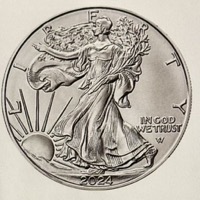
One time ante of a 1oz Silver Dollar / Round / Bullet, etc…
or $80 cash(as of 8/21/26)
✔
Pick any 5 games per week
(straight up)
Get your picks in before the published game time
Change a pick as often as you like — right up to that
game’s published game time
Each game locks at its own published game time — late
picks are not counted
Pick ahead if you want: every week of the season is open
Standings update in the app
✔
Most wins at the end of the regular season wins the pot
(tie splits pot)
Published game times come from ESPN and are shown in
Central time (CT). If a game is moved, its lock moves with it.
How the tabs work
Picks — your board
Tap a team to pick it. To undo a pick, or switch to the other
team in that game, tap twice: the first tap asks, the second does it,
and anything else cancels. That is so a stray tap on a phone cannot
lose you a pick. The five dots up top show how many you have in. A game you pick lifts to the top under
Your picks, so your five sit together with their scores
while the rest of the slate stays below. Each game locks at its own
published game time; until then you can change it as often as you
like.
Everyone — what the whole pool took
Every member's five for the week in one place, so nobody has to
scroll the group chat. A member's pick only appears once that game
has started — nobody can see what you took and copy it, and you
cannot see theirs either. What you can see beforehand is how many
picks each person has in, which names no team: anyone still short
sorts to the top so they can be nudged while it still helps. Once
games finish it sorts by who won the most.
Standings — the season so far
Rank, how you did this week, and your season total, with each
member's picks for the week under their name (green won, red lost),
so you can see who still has what to play. As on Everyone, a pick
only shows once its game has started. Tap any name to
open their week-by-week line. Equal totals share a rank, and the pot
splits. Your own place (T- means tied) sits beside the pot at the top
of every page; tap it to jump to your row, which is marked.
The ‹ › arrows at the top change the week,
and they work on all three tabs.